Observe before adjusting
- 1
Record the indicator
Note the documented operating state and elapsed time.
- 2
Keep the passage fixed
Use the same source, level and bass routing.
- 3
Compare a supported mode
Change only the power mode if the manual permits it.
- 4
Document or escalate
Keep a reversible record; stop at a power or safety concern.
1.Record what actually changes
Before adjusting a gain knob, watch the status indicator and note the elapsed time. Does the indicator change to the standby state described in the manual, remain in its normal operating state, or go completely dark? Those are observations rather than diagnoses. Indicator colors are model-specific; a red lamp on one product need not mean the same thing on another.
Record the source, playback mode, master volume, subwoofer power mode and the programme passage. Add whether playback had paused or simply become quieter. A quiet conversation scene after a bass-heavy sequence is a different comparison from a receiver that has stopped playing altogether.
Repeat the observation without changing the settings. A single interruption during a streaming dropout does not establish a repeatable standby problem. If possible, use a locally available passage so that an unstable network is not another changing variable.
| Observation | Next check | Avoid concluding |
|---|---|---|
| Documented standby indicator | Power mode and signal-sensing instructions | Amplifier failure |
| Normal indicator but no bass | Source and receiver routing | Proven standby |
| Unit completely unresponsive | Documented behavior or qualified service | A gain adjustment fixes a power fault |
| Interruption follows wireless dropout | Wireless-link state | Standby threshold is the only cause |
2.Distinguish standby from missing bass
A bass-light passage is not itself evidence of malfunction. The programme may contain little energy in the range sent to the subwoofer. Compare the same passage with the same source before changing a crossover, speaker-size setting or listening mode. Changing bass routing to keep an indicator illuminated can alter the entire system balance.
For the broader division of bass between speakers and subwoofer, use the existing crossover-versus-LFE guide. This article addresses a change in operating state, not room placement or electrical hum.
For bass-routing questions, read Crossover vs LFE: Which Bass Setting Does What?.
3.Read the power-mode instructions for your exact model
Klipsch's general controls article distinguishes automatic signal-triggered operation from a continuously on setting on the products it describes. That makes a documented mode comparison useful, but the article is not a promise that every subwoofer has the same switch or behavior.
Some products offer only an automatic mode, while others provide a sensitivity selector, a supported trigger connection or an app setting. Do not infer functionality from a similarly named product. Photograph or write down the current setting before changing it, and restore it if the comparison is inconclusive.
Yamaha's YST-SW015 manual describes model-specific automatic-power behavior and a sensitivity choice. Its timer and switch positions must not be generalized to another model. The point of consulting that manual is to recognize that signal detection is a product feature with documented conditions, not to borrow its settings for unrelated equipment.
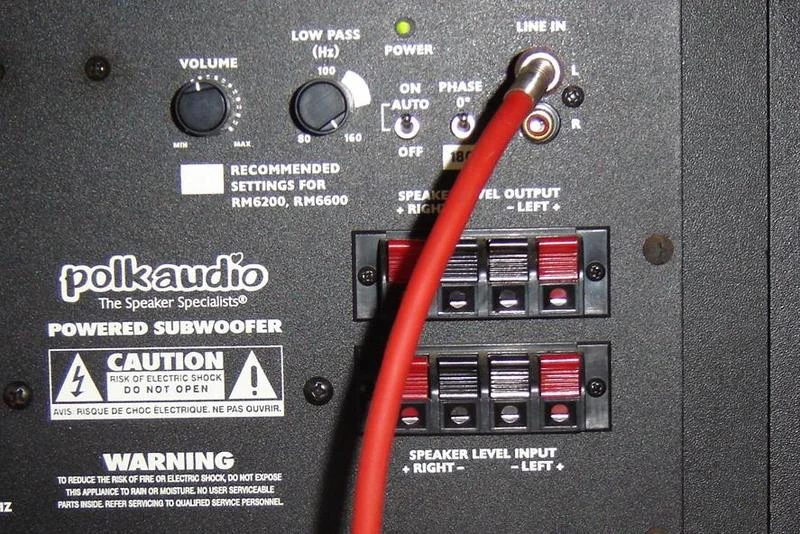
The reference photograph shows an ON/AUTO label combined at one switch position and OFF at the other. It is an example of why the labels on your own unit matter; the photograph does not establish a separate always-on setting or a measured standby threshold.
(1)Keep the comparison reversible
- Record model, power mode and indicator state.
- Keep source, passage, volume and routing fixed.
- Preserve receiver trim and subwoofer gain before changes.
- Do not open the panel or bypass protection.
4.Compare power modes without changing the sound balance
If your manual permits a continuously on setting, compare that setting with automatic mode while keeping the programme, receiver level, subwoofer gain and routing fixed. Use a comfortable level throughout. Observe whether the interruption recurs over the same passage and time window.
If the interruption disappears only with the supported alternative mode, automatic detection becomes a stronger explanation. It still does not establish the exact threshold, prove every component is fault-free, or tell you which permanent setting is appropriate. Read the manufacturer's intended-use and energy guidance before leaving a mode changed.
If the interruption persists while the indicator remains in its normal state, stop treating it as a proven standby event. Return to the signal route and record what the source and receiver report. Changing several controls until bass returns destroys the comparison you were trying to make.
5.Keep receiver trim and subwoofer gain separate
Receiver output level and the subwoofer's gain control belong to different points in the signal path. Turning one up while turning the other down may change the signal reaching a detector even when the final acoustic balance seems similar. However, available headroom, calibration limits and the detector's location depend on the equipment.
Do not apply an internet instruction to add a fixed number of decibels to every receiver. Preserve the current calibration and use the manufacturer's procedure for the exact combination. If support recommends a level redistribution, write down both starting values and the requested new values, then verify the bass balance again.
An automatic calibration result is not permission to ignore the manufacturer's supported range. Likewise, a working standby mode is not evidence that the subwoofer level is acoustically correct. Those are separate checks, covered in the AVR calibration and subwoofer integration guides.
To verify calibration separately from power state, see Home Theater Calibration: What to Check After Auto Setup.
6.Use a comparison record that support can interpret
Consider a hypothetical system that enters its documented standby state during a quiet passage in automatic mode but stays active over the same passage in a supported on mode. That result points toward signal detection under those conditions. It does not measure a detector threshold or demonstrate a defective circuit.
A useful record includes the model, firmware where applicable, input used, power mode, receiver volume, gain setting, passage and elapsed time. Add the indicator state before and after the interruption. Keep the same record for a second run; consistency is more useful than an emphatic description such as "it always cuts out."
Send those observations to the manufacturer if the manual does not explain them. Ask whether the model supports a different sensitivity or control method. Do not improvise a trigger cable, defeat standby internally, or use excessive playback levels to force detection.
7.Key terms and common questions
(1)Common standby questions
Should I just turn up the subwoofer?
Not before identifying the operating state. Increasing bass can hide a symptom while upsetting system balance. Follow a model-specific adjustment procedure if needed.
Does standby always mean there is no input signal?
Signal detection operates under documented conditions. An input may be present without meeting those conditions. Another model does not establish a universal threshold or delay.
Should I disable auto standby permanently?
Use only supported settings suitable for the installation. A temporary mode comparison is not a universal recommendation about long-term operation or energy use.
8.Technical references and editorial scope
Research-based educational guidance. Sources support fact checking; they are not text to reproduce. No original measurements or hands-on product test are claimed. Follow the instructions for your equipment. Our editorial and corrections policy.
Have a question or spotted a correction? Write to the editors ↗