What to save before you change settings
- Confirm that the detected speaker map matches the connected channels.
- Save crossover settings and check whether any speaker was unexpectedly assigned full-range bass.
- Record channel trims and investigate values at the adjustment limit.
- Keep the saved subwoofer distance until you have a repeatable reason to change it.
1.Make the calibration run repeatable
Take a photo of the speaker layout and bass settings or save a preset if your receiver allows it. Note which outputs are connected and any settings on a powered subwoofer. Use the microphone and orientation specified by the calibration system. A USB measurement microphone with a calibration file and a supplied receiver microphone can have different connection and setup requirements. Follow your model's instructions for the subwoofer gain and low-pass control.
Use a stable stand and run the test when the room is quiet. For systems that start at the main listening position, place the microphone where the primary listener's head would be, at seated ear height. Then follow the system's pattern for the remaining samples. A couch with three regular listeners calls for a different measurement area from a single chair, but the allowed spread and order depend on the system. If a measurement fails because someone walked through the room, repeat the affected measurement as the setup software permits before changing equipment.
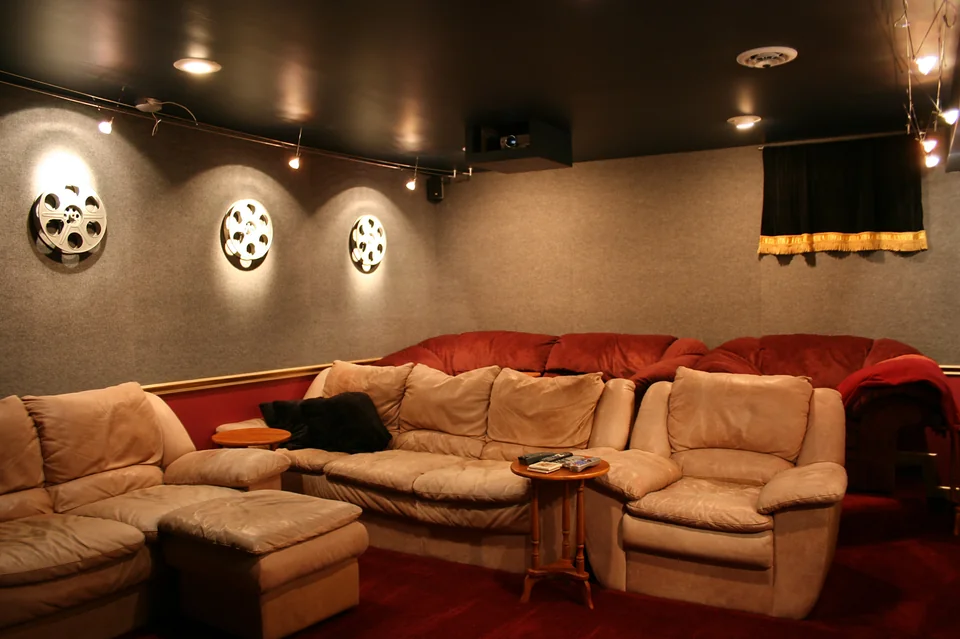
The cover photograph shows a main sofa and a second row. If your household mostly uses the main sofa, start with the seat you listen from and follow the calibration software’s sampling pattern around that area. If the back row matters, check it afterward with the same material. Include it during calibration only if the system’s placement guidance allows that span. The photograph is a seating reference and shows no measurement in progress.
Source for this section: Dirac: measurement positions ↗
2.Check the speaker map before changing EQ
Compare the receiver's detected layout with the physical room. Check the center channel, surrounds, height channels, and each configured subwoofer output. An absent channel can have several causes. Confirm the speaker is enabled and assigned to the intended output, then consult the receiver's guidance for wiring checks. Power down before moving speaker leads. If you change a speaker connection, output assignment, or the physical position of a speaker, plan to rerun calibration.
3.Treat distance as a timing setting
Many receivers label an alignment control as distance because a sound that travels farther reaches the listener later. The subwoofer path can introduce additional delay through its electronics or processing, so the reported value may differ from the cabinet-to-seat distance. Denon documents this behavior for its AVR-X6800H Audyssey setup. A larger reading alone gives you little reason to replace it.
For example, if the cabinet is roughly eight feet away and the receiver reports twelve, leave the setting in place for the first listening check. If bass repeatedly thins out near the crossover, save the preset and investigate the blend between the mains and subwoofer. A dip that shifts substantially when you move to the next seat also merits a room or placement check. Keep the distance setting reversible if you later compare a timing adjustment.
Source for this section: Denon AVR-X6800H: Audyssey setup ↗
For timing checks at the crossover, read Subwoofer Phase, Polarity and Delay: What to Adjust First.
If quiet listening changes the subwoofer power state, use Subwoofer Turns Off at Low Volume? Check Auto Standby First.
| Result | First check | When to act |
|---|---|---|
| Center is absent | Confirm assignment and connection | Correct the fault, then rerun detection |
| Surrounds seem reversed | Play channel-identification tones | Power down and trace leads before reconnecting |
| Polarity warning | Compare terminal markings and consult the manual | Correct a confirmed wiring reversal |
| Subwoofer trim at its limit | Check model-specific gain instructions | Adjust as directed and rerun if it could not set the level |
4.Verify where bass is being sent
Record the speaker size or bass-management setting and each crossover the receiver selected. On receivers with Small and Large options, those labels can govern bass routing rather than cabinet dimensions. Whether to redirect bass from a floorstanding speaker depends on what the speaker and subwoofer can do at your listening level and how they blend in the room.
Play something familiar that contains bass in ordinary speaker channels, as well as a multichannel source if you want to check the dedicated low-frequency effects channel. These tests answer different questions. A subwoofer can play an LFE effect while a speaker channel's bass follows a different route. If the sub is quiet with music, check the active listening mode and speaker configuration before concluding that the sub is broken.
For more on this routing distinction, read Crossover vs LFE: Which Bass Setting Does What?.
5.Compare at the seats you use
At the main seat, use a familiar dialogue scene at a comfortable volume. Confirm voices come from the expected place and that quiet passages remain intelligible.
Move to a regularly used side seat and replay the same passage. Note whether dialogue changes, bass gets louder or weaker, or both.
If you compare presets, use the same source and listening mode and match apparent playback levels as closely as practical. Record any loudness or dynamic-range feature that differs between presets.
Change one variable and replay the same passage. If a change helps one seat while making another worse, keep the notes and decide which seats matter before changing more settings.
Suppose dialogue is clear in the center seat but difficult at one end of the couch, and bass is similar at both seats. Check center-speaker placement and obstructions before raising the center trim for the whole room. If dialogue stays clear but bass fades at one seat, test seat or subwoofer placement before applying a global boost. See the dialogue troubleshooting guide and the room-bass diagnosis workbook for those two paths.
If the issue is dialogue, start with How to Make TV Dialogue Clearer: A Step-by-Step Check.
If the issue is seat-dependent bass, use Uneven Bass in a Room? A Step-by-Step Diagnosis Workbook.
6.Know when to run calibration again
Rerun it after moving a speaker, changing the subwoofer's position or gain, changing which seats you intend to cover, or changing the channel layout. If you change a listening preference such as a dynamic-range option, compare that feature separately first. Keep a small record of the microphone pattern, speaker assignments, crossovers, distances, trims, and the settings you ultimately kept.
Some systems offer additional processing. Dirac Live distinguishes Room Correction from Bass Control, which coordinates speakers and subwoofers, and Active Room Treatment (ART), which coordinates available channels to address low-frequency decay. Consult the manufacturer for your exact model, software support, and license before assuming a receiver can run either add-on. Recheck the same dialogue and bass passages after enabling a new processing mode.
Source for this section: Dirac: Bass Control ↗
Source for this section: Dirac: Active Room Treatment ↗
7.Key terms and common questions
(2)When should you start over?
Do I need to rerun after moving the microphone between two samples?
Follow the measurement pattern in your setup software. If you accidentally recorded the wrong location, repeat that point if the system allows it.
8.Technical references and editorial scope
- Denon AVR-X6800H: Audyssey setup ↗
- Dirac: measurement positions ↗
- Dirac: Bass Control ↗
- Dirac: Active Room Treatment ↗
Research-based educational guidance. Sources support fact checking; they are not text to reproduce. No original measurements or hands-on product test are claimed. Follow the instructions for your equipment. Our editorial and corrections policy.
Have a question or spotted a correction? Write to the editors ↗