| What you need | Start by checking | Observe at the receiver |
|---|---|---|
| Decoded surround | Source decoding and multichannel transport | Actual PCM channel count |
| Receiver decoding | Compatible encoded output and supported input | Expected codec and input channels |
| TV passthrough | Format support at the TV and receiver | Whether the incoming format survives |
| Atmos | Compatible source mode, transport and renderer | Whether the input carries Atmos |
1.Choose which device decodes the soundtrack
Pick PCM when the source can decode the soundtrack and send the channels you need. Pick bitstream when you want a compatible receiver or soundbar to decode the encoded soundtrack. Start with the channel count and features you need, then check whether each device and connection can carry them. A receiver showing PCM can be receiving stereo or multichannel sound.
Consider a player with a losslessly encoded 5.1 track and a direct HDMI connection to a receiver. If the player decodes that track correctly and sends all six channels as linear PCM, the receiver can work with the resulting samples. Sending the encoded track for the receiver to decode shifts that job downstream. Level settings, mixing, downmixing, metadata handling and postprocessing can still differ between the two paths.
Source for this section: Dolby: PCM audio and home theater formats ↗
2.Keep input format, input channels and listening mode separate
Read the receiver's incoming-signal information rather than relying on the large label on its display. Write down the format, input channel count and selected listening mode as three separate observations. Stereo PCM played through an upmixer may use several speakers while the incoming signal remains two-channel.
If the input shows multichannel PCM, the source has already delivered decoded channel audio. A missing codec badge by itself does not tell you that channels disappeared. If the input shows two channels when you expect six, start with the selected track and the source's speaker or output configuration. Then examine the next device in the route.
For the roles of each device in the path, read Audio Signal Chain Explained: From Source to Speakers.
(1)Follow the format through the chain
- 1
Source
Record the selected soundtrack and source output.
- 2
TV, when present
Check whether the TV forwards, decodes or converts the selected signal.
- 3
Receiver
Read input channels separately from the listening mode.
3.Treat TV PCM and pass-through as model-specific choices
A television can receive a signal from an external player, create audio in an internal app or change the format before forwarding it. Its PCM setting does not promise that every input will remain multichannel. Pass-through is a request to preserve a compatible incoming format where the model supports it. It does not create a format that the app, source or receiver lacks.
Look up the output settings and compatibility table for your actual TV. Sony documents separate HDMI and optical audio settings on supported models. Use the same track for comparisons and change one setting at a time. When a TV app and an HDMI player behave differently, keep two records. The app and player may offer different tracks, and the TV may handle their signals differently.
Source for this section: Sony: TV audio output options ↗
For a silent optical route, use the focused checklist for TV Optical Audio Has No Sound? Check the Signal Path.
4.Verify the format on the connection you actually use
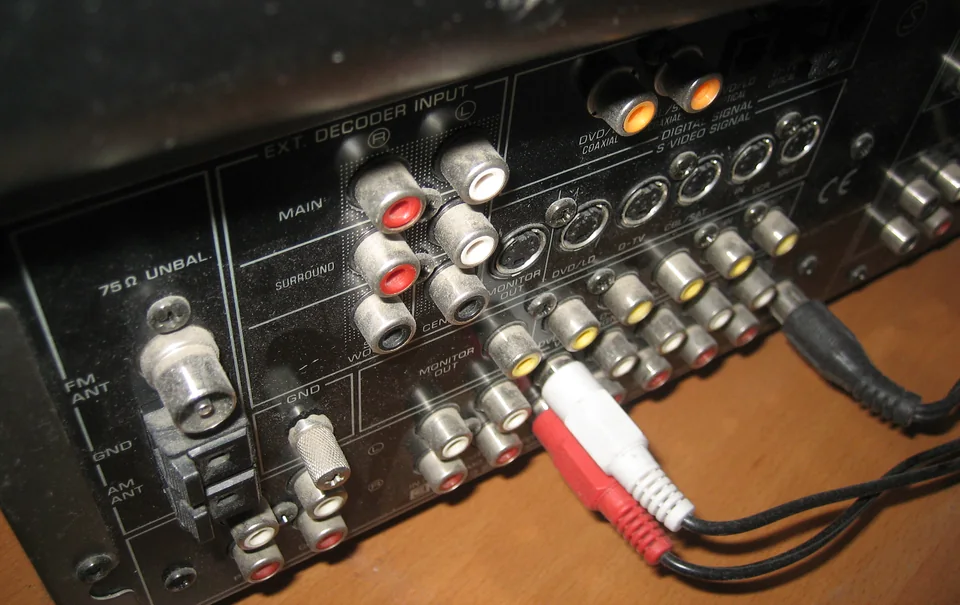
The digital input and analog RCA inputs on the reference photograph illustrate two different jobs. A digital input can accept compatible digital audio; a group of analog inputs receives signals that have already been converted to analog. The labels on a particular rear panel are a starting point for the model's manual.
The Sony STR-DN1080 manual gives a useful example of why the connection matters. Its format table lists multichannel linear PCM for HDMI and eARC, and lists Dolby Digital on optical and coaxial inputs as well. Check your own equipment rather than assuming the same list applies. If a direct player-to-receiver route preserves the expected channels but a TV-mediated route does not, investigate the TV output and return path before replacing hardware.
Source for this section: Sony STR-DN1080: formats by input connection ↗
For return-link capability and routing, read HDMI ARC vs eARC: Formats, Connections and Common Problems.
5.Check what Dolby MAT changes
Some devices deliver Atmos using Dolby MAT, which can carry PCM audio with Atmos metadata. This is a reason to distinguish plain channel-based PCM from an Atmos-capable output that uses MAT. Dolby's technical documentation describes the encoding approach. The feature depends on the source, the intervening connection and the destination, so confirm model-level support and the receiver's reported input.
For ordinary surround playback, ask whether the intended channel count survives. For Atmos, also ask whether the rendering information survives. A PCM menu choice and an Atmos-capable system do not establish the answer on their own.
Source for this section: Dolby: Atmos and Dolby MAT technical background ↗
6.Diagnose unexpected stereo with a controlled comparison
Choose a familiar track with a documented multichannel option. Confirm the selected language and audio track, set a comfortable level and save the current settings. Record the source output, TV output if present, and receiver input. Try the next compatible output setting while leaving the other devices and track unchanged.
For an illustrative comparison, suppose a player connected directly to a receiver reports 5.1 PCM. Through the TV, the same player reports two-channel PCM at the receiver. This narrows the difference to settings or capabilities introduced by the second route. It does not identify the exact limitation. Compare TV input and return settings, and use the receiver's information screen again. If both paths already provide the channels and features you need, keep the one that works reliably with your other sources.
7.Key terms and common questions
(1)Common questions
Does PCM mean stereo?
No. Read the input channel count. The source, TV settings and transport determine which channels the receiver gets.
Why did the Dolby badge disappear after switching output?
The player may be decoding the track upstream. Compare the actual input channels and any needed metadata before deciding that a feature was lost.
8.Technical references and editorial scope
- Dolby: PCM audio and home theater formats ↗
- Sony STR-DN1080: formats by input connection ↗
- Sony: TV audio output options ↗
- Dolby: Atmos and Dolby MAT technical background ↗
Research-based educational guidance. Sources support fact checking; they are not text to reproduce. No original measurements or hands-on product test are claimed. Follow the instructions for your equipment. Our editorial and corrections policy.
Have a question or spotted a correction? Write to the editors ↗